Saturday, March 27, 2010

Convert Minutes to HH:MM format

Convert Mins to HH:MM format
Mins/1440
Would give the required output.. just format the cell to HH:MM
1440 = 24hrs * 60 mins


Stop the screen flicker while running the macros

Insert this code at the beginning of the code

Application.ScreenUpdating = False
.
.
.
your Code
.
.
.
The below code goes as the last line
Application.ScreenUpdating = True


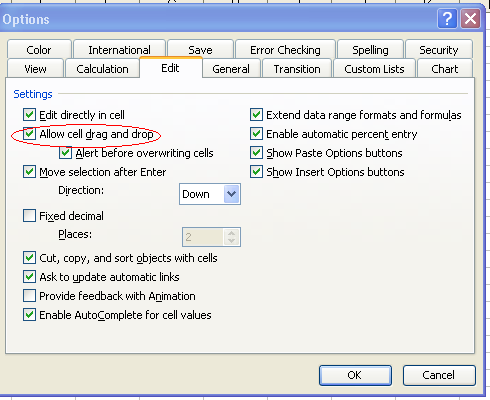
How to enable Autofill handle in Excel

When i click on a cell there is no autofill handle....

Goto Menu - Tools, Options, Edit
Check the "Allow cell drag and drop" box 

Changing Case of a Text

Lets see how to change the case of the text

In Excel - formula is 
Upper(A1)  this would convert the text in A1 cell to Uppercase
Lower(A1) this would convert the text in A1 cell to Lowercase

If the same has to be implemented in Excel macro the coding goes like this

Varnamet = UCase(the cell or value)

Some tips for using IF condition

Here are some tips for using IF Condition in Excel

For not equal condition use
If (condition A <> 0, "Yes","No")


using multiple conditions using IF
If(And(Condition A <>0, condition B>1000), "Yes", "No")

.....here both the conditions should be met for YES.... the number should not be equal to '0' and also it should be greater than 1000

If (or(condition A <> 0, condition B >1000),"Yes","No")

Here ... if.. either of the condition is met then it would give "Yes" else  "No"


How to work with protected excel workbook


If you have protected your workbook with a password and it also has a macro in it... you got to use the below codes

.... at the beginning of your program
ActiveSheet.Unprotect Password:="Password1234$$"
.
.
.
your coding goes here
. 
.
.
.
.
.... at the end of your program
ActiveSheet.Protect Password:="Password1234$$"

Create a time delay in Excel macro code

If you want to delay the execution of the program by 30 seconds.. .then add the below code to your macro


Application.Wait Now + TimeValue("0:00:30")
 
likewise if you would like to delay the process by 90 seconds... then
Application.Wait Now + TimeValue("0:01:30") 
 
Have a great day :-)